Create, Learn and Program
Three products for different parts of learning: create the content in Create, let participants learn at their own pace in Learn, and combine self-study with learning-group meetings in Program. They can be used separately or as a combined unit. We adapt the solution to your requirements for content, ways of working, design and data handling.
Create, deliver and hold the training together
Authoring tool
Care of Skills Create™
The authoring tool for building and adapting course content. Over 50 blocks, voice, Graphics Studio and generative AI give producers and editors support through production.
The course content and interactions are created and refined here.
Example: An editor builds an introductory course with scenarios, images and knowledge checks.
Learning platform
Care of Skills Learn™
The learning platform for self-paced learning. Courses, exercises, reflection, users and diplomas — with measurement to follow progress and create a basis for an improved learning experience.
Participants' courses, completion and follow-up are gathered here.
Example: A new employee takes the course at their own pace, does the exercises and receives a diploma when the training is complete.
Blended learning
Care of Skills Program™
Effective digital training of large and smaller groups. Inspiring e-learning on your own, combined with moderated learning-group meetings for exercises, discussion and exchange of experience.
Self-study and moderated learning-group meetings are held together in a programme.
Example: A learning group prepares digitally, meets to practise and discuss, and continues working between sessions.
Tools for course production in Create
Interactions
50+ ways to create better learning. Hotspots, drag-and-drop, branching, scenarios, before-and-after and much more. Everything carefully thought through down to the smallest detail, gathered in a toolbox for producers and editors.
Knowledge tests
Tests should do more than check that someone clicked through. With varied question types, thoughtful feedback and flexible settings, every knowledge check becomes part of the learning, while also giving a clear validation of the participant's knowledge.
Interactive video
An easy-to-use platform for interactive video that participants actually find enjoyable. Branches, choices and clicks that drive learning — engaging without requiring technical expertise.
<Kursfilm
scen="intro"
voice="sv-SE"
/>
)
Code-based video
Video in the course: personalisation and playback against the same content. When the film itself needs to be produced or exist in many versions, that is Care of Skills Video.
Graphics Studio
Create new motifs based on a shared style, the course colours and selected reference images. Compare suggestions, create variants and save the images with their recipes in the image library. Then the starting points remain when the next course part needs illustrations.
Narration
Integrated voice services give producers support to create narration in Swedish and English. Voice, pronunciation and pace need to fit the content and be reviewed in context in the course.
Technology and tools behind Care of Skills Create, Learn and Program
Our platforms are built on modern web technology. In development work we use AI-assisted coding tools such as Codex, Cursor and Claude Code. We have many years of practical experience using AI in digital training. The experience covers architecture, development, testing, security, personal data handling and quality assurance.
Here are examples of technology and tools we use.
Web technology and operations
Development tools
Graphics Studio · part of Care of Skills Create™
An image workflow built for training production
Graphics Studio is the image workshop in Care of Skills Create. We have built the workflow around the tasks a producer or editor faces as a course takes shape: illustrate content, adapt the image to a component, keep the expression together through a module, and edit the material when needs change.
The image generation and AI processing themselves are performed by external services such as Recraft and fal.ai — standalone products from other vendors. We have built Graphics Studio to gather selected features from these services in a workflow adapted for training production. Our development work sits in the interface, the integrations and the support for the producer’s day-to-day: from subjects and styles to adjustments, image library and reusable recipes.
We use Recraft and fal.ai flexibly based on the image’s purpose and the processing needed. Recraft’s API gives access to their own image models, while fal.ai offers models from several providers. We choose among the models and features connected to Graphics Studio based on the task, the format and the support for reference images.
In our work we also use Figma Make and Figma Weave, standalone products from Figma. Make is a tool for interactive prototypes and interfaces, while Weave combines AI models and creative processing steps in visual workflows.
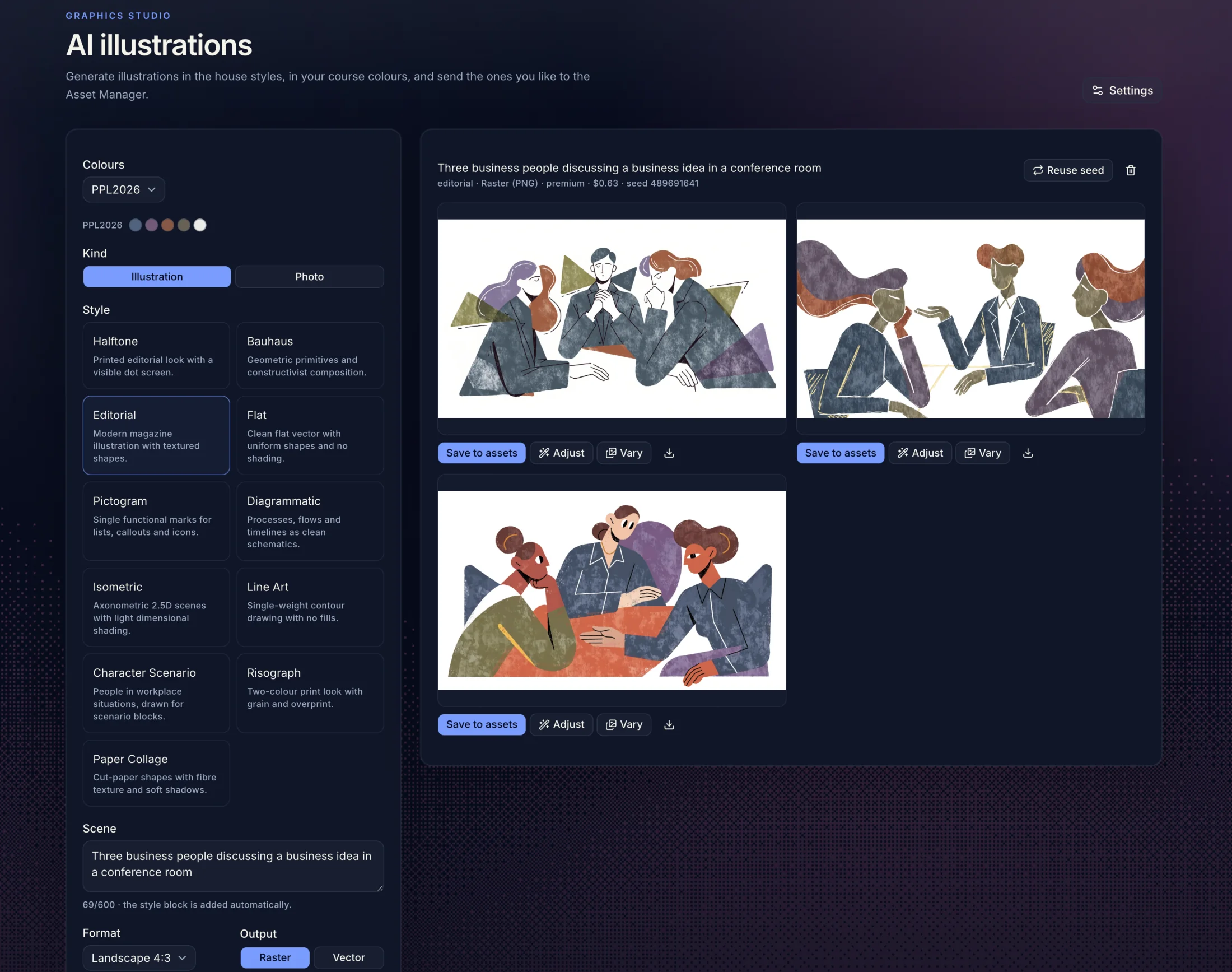
Describe the subject
Start from the module’s content: what should the image explain, and in which component will it be used?
Choose visual language
Combine style and colour palette with visual references. A house style can be created from selected illustrations.
Compare the suggestions
Assess what the images show and how they fit together. Discard suggestions that diverge in style or content.
Edit and review
Create a new variant or adjust a pixel image with an instruction. Check cropping and readability in the component where the image will be used.
Save image and recipe
Save in the image library. Open the image again when the next course section needs a new variant or a new subject.
A new variant
A new interpretation of the same idea and style. People, objects and composition can be redrawn. Suited when you want to try another suggestion.
An adjustment
Starts from an existing pixel image and an instruction, for example “replace the whiteboard with a screen”. Also check the parts that should remain after the change.